 Game Day Board
Coach with Claude or ChatGPT
Ask an AI app about your team. It reads your real teams, lineups and playing time, and only changes things when you ask.
About 100 tools: everything the app does, an assistant can do.
- Who’s behind on playing time?
- Import my schedule and add training every Tuesday.
- Set up the lineup for Saturday’s game.
- Who have I played in goal this season?
- Share the lineup with the parents.
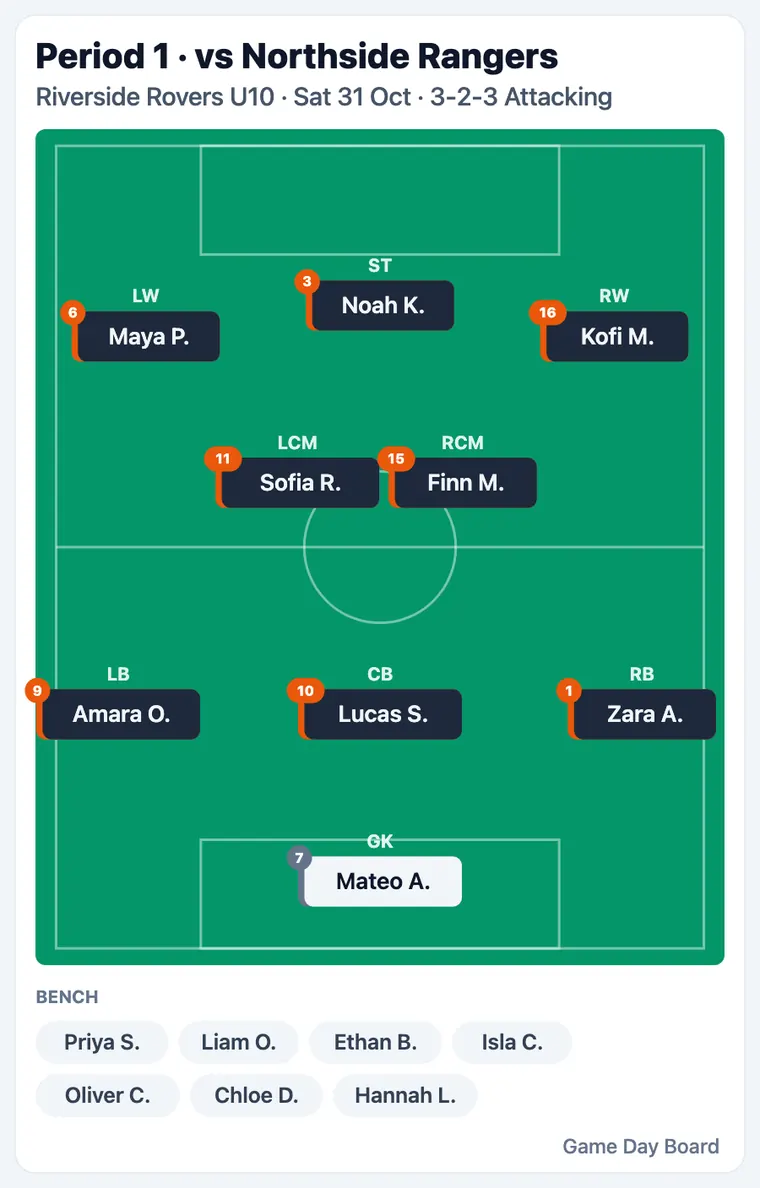
Plan Saturday's lineup against Northside Rangers so everyone gets fair time, and share it with the parents.
Used Game Day Board: plan_lineup, save_lineup, publish_game
Done. Four periods of 3-2-3: everyone plays two or three periods, and nobody sits out twice in a row. It's saved, and the parents have the link.
Connect it
Three steps in your AI app, once. The same address works in each.
The address to paste
https://gamedayboard.com/api/mcpEvery app asks for the same address. You sign in with the Google or Apple account you use for Game Day Board, then choose Allow.
Add it to Claude
- Open Claude and go to Settings, then Connectors.
- Choose Add custom connector and paste the address above.
- Sign in to Game Day Board and choose Allow.
Add it to ChatGPT
- Open Plugins in ChatGPT, choose Add, then Add custom MCP server.
- Name it Game Day Board, paste the address above, and choose OAuth. Leave the client ID and secret empty.
- Sign in to Game Day Board and choose Allow.
If you don't see Add custom MCP server, your plan or workspace may not allow it yet.
Add it to Gemini
Google's Gemini app can take a custom app by address in Settings, under Connected apps, but only on the web, in English, for some personal accounts in the United States. If you don't see Add a custom app, it isn't available to you yet. We will update this page when that changes.
What it does
Everything the app does, in your own words. Reading never changes anything; the rest asks first.
Try asking
“Share Saturday's lineup with parents and draft the email”
“Who is behind on playing time?”
“Log a goal for Owen”
“Is goal setup covered for the home games?”
What it can do
- See your teams, players, games, saved lineups and playing time.
- Run the match: start, pause and restart the clock, add or take off a minute, end a period, log goals, pick the captain and the player of the game.
- Publish a saved lineup as the link for parents, and give you the link.
- See who's coming to each game and training, and add training sessions.
- See who is doing snacks and goals, share the jobs out, and give one to a family.
- Plan and save lineups when you allow it: fill a period or the whole game, move players, change formations and the shape of a game, and save the lineup. It saves the way the Save button does, so it counts toward playing time, updates the parents' page if the game is published, and tells your other coaches.
- Manage your team when you allow it: rename players and set their ratings, change team and season settings, give the team a badge from an image, set up the duties, share the parents' code, and make a link to invite another coach.
What it can't do
- Delete teams, seasons, games or players, or remove a coach.
- See anything on teams you aren't a coach on.
The link for parents shows children by first name and last initial to anyone who has the link, so a good AI app will check with you before it publishes.
When it asks you first
Reading never changes anything. Anything that replaces something, removes something or tells other people (publishing the parents' link, asking families to reply, clearing goals, restarting the clock) is marked as such, so Claude and ChatGPT ask you before they run it.
Your data, and if something goes wrong
Your data
- The app sees only the teams your account is already on, and only after you choose Allow.
- We keep which app is connected, when it was last used and how many requests it made each day. We never receive your conversations with the AI app.
- Children show to parents by first name and last initial. Parents never see playing time or ratings.
- Disconnecting stops access at once, and nothing the app did is undone: the changes are in your team like any you made yourself.
If something goes wrong
- “Couldn't verify this app” on the Allow screen: start again from the AI app's own connector screen; the address must be exactly the one above.
- It says it can't reach a tool: disconnect and add the connector again, and choose Allow. Older connections were asked for fewer permissions.
- “Daily limit reached”: each coach has a daily allowance of requests across all their apps. It resets the next day.
- A parent sees no team: a parent connects with the same address but must first join the team with the coach's code.
If you're a parent
Join your child's team with the code from the coach, then connect the same way. It can show where your child plays once the lineup is out, what's coming up, and the season's results, and you can say Going or Can't make it, see your team jobs, and accept, swap or give one back. It only sees the teams you follow as a parent.
“Where is Maya playing on Saturday?”
“Tell the coach Owen can't make Thursday's training”
“Do I have any team jobs coming up?”
Disconnect
Open the ☰ menu in Game Day Board, choose Connected apps, and Disconnect the app. It loses access straight away. You can also remove it from inside the AI app.
Questions: gamedayboard@gmail.com. What an AI app does with your information is covered by its own privacy policy; ours is at gamedayboard.com/privacy.
Every tool
What an AI app can do, grouped the way you would ask. You never type these names: say what you want and the app picks the tool. The names are here for the curious, and for the app directories that ask for them.
Read your teams
See teams, rosters, games, lineups, playing time, the season, training, who is coming and who is doing what.
Show the 16 tool namesHide the tool names
list_teams · get_roster · list_games · get_game · get_fairness · get_season · get_player · list_formations · position_guide · list_training · get_attendance · list_events · get_duties · list_parents · get_player_instructions · get_homework
Plan lineups
Suggest, fill, move and save lineups, formations and the shape of a game, the way the app's Fill and Save buttons do.
Show the 14 tool namesHide the tool names
plan_lineup · fill_lineup · save_lineup · move_player · set_formation · apply_across_periods · set_game_shape · clear_lineup · save_team_formation · rename_team_formation · delete_team_formation · set_fill_learning · set_formations_follow · reset_usual_position
Share with parents
Publish or stop sharing the parents' link, draft a message to the team, and see contacts.
Show the 6 tool namesHide the tool names
publish_game · unpublish_game · draft_team_message · get_team_contacts · get_parent_code · set_player_highlights
Match day
Run the clock, log goals and the score, and pick the captain and the player of the game.
Show the 13 tool namesHide the tool names
start_clock · pause_clock · adjust_clock · end_period · restart_clock · set_clock_length · log_goal · remove_goal · edit_goal · clear_goals · set_score · set_captain · set_player_of_game
Schedule and replies
Add or change games, training and team events, and ask who is coming.
Show the 13 tool namesHide the tool names
create_game · import_schedule · update_game · delete_game · create_training · update_training · delete_training · create_event · update_event · delete_event · share_out_event · mark_attendance · ask_for_replies
Duties and homework
Share out snacks, goal setup and other jobs between families, and set training homework.
Show the 9 tool namesHide the tool names
share_out_duty · assign_duty · add_duty_to_event · open_duty · set_duty_exclusions · set_duty · set_duty_events · set_homework · mark_homework_done
Manage the team
Teams, seasons, players, ratings, instructions and objectives, settings, the badge, and who can see the team.
Show the 18 tool namesHide the tool names
create_team · update_team · update_team_settings · set_team_badge · clear_team_badge · create_season · update_season · add_players · update_player · set_player_ratings · set_player_left · set_player_instructions · clear_player_instructions · set_player_objectives · set_team_words · remove_parent · create_coach_invite · set_notifications
For parents
Where your child plays, what is coming up, replying Going or Can't make it, your team jobs and your child's homework.
Show the 13 tool namesHide the tool names
my_children · upcoming · where_is_my_child · season_results · reply_to_event · my_homework · reply_to_homework · follow_child · my_duties · team_duties · reply_to_duty · set_my_child · join_team_with_code
Feedback
Send Game Day Board an idea or a problem. Your AI app may suggest one, but it shows you the words and sends only when you say yes.
Show the 1 tool namesHide the tool names
send_feedback